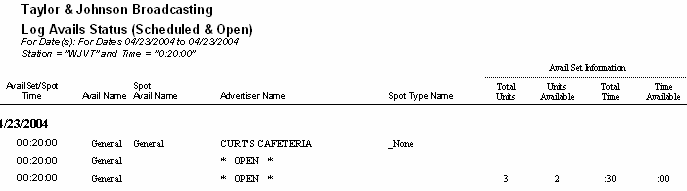
Log Avails Status (Scheduled and Open)
Use this report to show each avail that is open and/or scheduled for a particular log day for inventory purposes.
This report can show open and scheduled avails without printing any other log elements such as Log Events. This allows the user to focus specifically on the avails for a particular log day.
There are three versions of this report.
- Log Avails Status (Open Avails) - This version will only print the avails that are open and not filled on the log. This can help in determining what avails are left to sell for a particular day in conjunction with the Avail Set Information that shows how many units and how much commercial time is available in the break.
- Log Avails Status (Scheduled Avails) - This version only prints avails that have been filled in addition to the advertiser name, spot avail name, and spot type of the spot that placed there. The Avail Name is the avail code that is on the log at that location. The Spot Avail Name is the avail code that is coded to the order's spot pattern for that spot. This allows the user to not only see what is scheduled, but also to see if any spots placed in a position on the log that does not match the avail code of the spot.
- Log Avails Status (Scheduled & Open) - This prints both what has been scheduled onto the log as well as any avails that are currently open that have not yet been filled.
These same reports can also be run from within VT by going into the Log Editor and selecting the Print Menu and then choosing Log Avails Status.
Report Options
| Grouping Options |
Filter Options |
Other Options |
| |
Avail Name
Station
Spot Avail Name
Spot Type
Time |
|
Sample Report