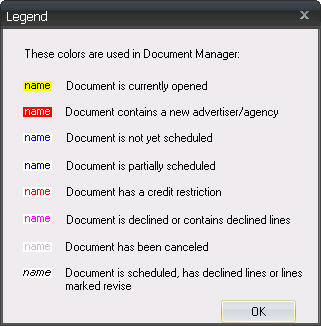
In Document Manager, colors are used to indicate an abnormal condition or status of orders. Normal orders appear in black font.
The color legend can be viewed at any time by going to the Application Menu and choosing Color Legend.
The following chart can further explain each of the color schemas:
Color |
Condition |
Yellow Highlight |
This order is currently open either by you or another user. Only the first user to have the order open will be able to save changes. |
Red Highlight |
This order contains a new advertiser or agency. The advertiser or agency will need to be cleared (remove new status) by the Business Department before this order can be scheduled. |
Royal Blue Font |
This order has not yet been scheduled in Traffic. |
Dark Blue Font |
This contract is a multi-station contract that has been partially scheduled in Traffic (i.e., at least one, but not all stations on the contract have been scheduled in Traffic). |
Red Font |
This order contains an agency or direct advertiser with a credit restriction other than Unlimited. |
Pink Font |
This order is declined or contains declined lines. |
Gray Font |
This order has been canceled. |
Black Italic Font |
This order has some approved lines that have been scheduled, but also has some declined or "need to revise" lines that have not been scheduled in Traffic. |